SmarkForm
🚀 Add subforms, dynamic lists, hotkeys and more to any HTML form in one line of JavaScript.




🔇 Autoplays muted — unmute it (🔊 in the player controls) to hear the narration.
Interactive Demo
A nested subform, a sortable list, context-driven hotkeys, and date/time coercion — all driven by data-smark attributes with zero extra JavaScript.
<div id="myForm">
  <div class="ep">
    <p>
      <label data-smark>📋 Event:</label>
      <input data-smark name="title" type="text" placeholder="e.g. Sprint Review">
    </p>
    <p>
      <label data-smark>📅 Date:</label>
      <input data-smark name="date" type="date">
    </p>
    <p>
      <label data-smark>⏰ Time:</label>
      <input data-smark name="time" type="time">
    </p>
    <fieldset data-smark='{"type":"form","name":"organizer"}'>
      <legend data-smark='label'>👤 Organizer</legend>
      <p>
        <label data-smark>Name:</label>
        <input data-smark name="name" type="text">
      </p>
      <p>
        <label data-smark>Email:</label>
        <input data-smark name="email" type="email">
      </p>
    </fieldset>
    <div class="ep-list">
      <button data-smark='{"action":"removeItem","context":"attendees","hotkey":"Delete","preserve_non_empty":true}' title='Remove empty slots'>🧹</button>
      <button data-smark='{"action":"addItem","context":"attendees","hotkey":"+"}' title='Add attendee'>➕</button>
      <strong data-smark='label'>👥 Attendees:</strong>
      <ul data-smark='{"type":"list","name":"attendees","sortable":true,"exportEmpties":false}'>
        <li>
          <details>
            <summary>
              <span data-smark-type="label" class="bullet">
                <span data-smark-action="position">N</span> ☰
              </span>
              <input data-smark type="text" name="name" placeholder="Name">
              <button data-smark='{"action":"removeItem","hotkey":"-"}' title='Remove'>➖</button>
              <button data-smark='{"action":"addItem","hotkey":"+"}' title='Insert here'>➕</button>
            </summary>
            <div class="ep-attendee-details">
              <input data-smark type="email" name="email" placeholder="Email">
              <input data-smark type="tel" name="phone" placeholder="Phone">
            </div>
          </details>
        </li>
      </ul>
    </div>
    <p class="ep-hint">💡 Hold <kbd>Ctrl</kbd> to reveal shortcuts</p>
  </div>
</div>
#myForm .ep {
    display: flex;
    flex-direction: column;
    gap: 0.35em;
    max-width: 460px;
    font-size: 0.95em;
}
#myForm .ep p {
    display: flex;
    align-items: center;
    gap: 0.5em;
    margin: 0;
}
#myForm .ep label {
    font-weight: 500;
    white-space: nowrap;
}
#myForm .ep label:not(.bullet) {
    min-width: 4.5em;
}
#myForm .ep input {
    padding: 0.3em 0.5em;
    border: 1px solid #ccc;
    border-radius: 4px;
}
#myForm .ep input[type="text"],
#myForm .ep input[type="email"] { flex: 1; }
#myForm .ep fieldset {
    border: 1px solid #ddd;
    border-radius: 6px;
    padding: 0.4em 0.8em 0.6em;
    margin: 0;
    display: flex;
    flex-direction: column;
    gap: 0.3em;
}
#myForm .ep fieldset legend { font-weight: bold; padding: 0 0.3em; }
#myForm .ep-list ul {
    list-style: none;
    padding: 0;
    margin: 0.2em 0 0;
    display: flex;
    flex-direction: column;
    gap: 0.25em;
}
#myForm .ep-list ul li { display: flex; align-items: flex-start; gap: 0.3em; }
#myForm .ep-list ul li details {
    width: 100%;
    border: 1px solid transparent;
    border-radius: 4px;
    transition: border-color 0.15s;
}
#myForm .ep-list ul li details[open] {
    border-color: #ccc;
    padding-bottom: 4px;
}
#myForm .ep-list ul li summary {
    display: flex;
    align-items: center;
    gap: 0.4em;
    cursor: default;
    user-select: none;
    padding: 0.1em 0.2em;
    list-style: none;
}
#myForm .ep-attendee-details {
    display: flex;
    flex-wrap: wrap;
    gap: 0.4em;
    padding: 0.35em 0.4em 0.1em 1.5em;
}
#myForm .ep-attendee-details input { flex: 1; min-width: 120px; }
#myForm .ep-hint {
    font-size: 0.82em;
    color: #888;
    margin: 0.15em 0 0;
}
#myForm .ep-hint kbd {
    background: #f4f4f4;
    border: 1px solid #ccc;
    border-radius: 3px;
    padding: 1px 4px;
}
/* Hotkey hints revealed on Ctrl press */
#myForm [data-hotkey]{position:relative}
#myForm [data-hotkey]::after{
    content:"Ctrl+" attr(data-hotkey);
    position:absolute; top:-1.6em; left:0;
    font-size:0.7em;
    background:#333; color:#fff;
    padding:1px 4px; border-radius:3px;
    white-space:nowrap;
}
/* Attendee list item entry/exit animations */
#myForm .ep-list ul li.animated_item {
    transform: translateX(-100%);
    opacity: 0;
    transition: transform 200ms ease, opacity 200ms ease;
}
#myForm .ep-list ul li.animated_item.ongoing {
    transform: translateX(0);
    opacity: 1;
}
const myForm = new SmarkForm(document.getElementById("myForm"), {
    "value": {
    "title": "Sprint Review",
    "date": "2025-03-15",
    "time": "10:00:00",
    "organizer": {
        "name": "Alice Johnson",
        "email": "alice@example.com"
    },
    "attendees": [
        {"name": "Bob Smith",    "email": "bob@example.com",   "phone": "+1 555 200 0001"},
        {"name": "Carol White",  "email": "carol@example.com", "phone": "+1 555 200 0002"},
        {"name": "Dave Brown",   "email": "dave@example.com",  "phone": "+1 555 200 0003"}
    ]
}
});const delay = ms=>new Promise(resolve=>setTimeout(resolve, ms));
myForm.onAll("afterRender", async function(ev) {
    if (ev.context.parent?.options.type !== "list") return;
    const item = ev.context.targetNode;
    item.classList.add("animated_item");
    await delay(1);
    item.classList.add("ongoing");
});
myForm.onAll("beforeUnrender", async function(ev) {
    if (ev.context.parent?.options.type !== "list") return;
    const item = ev.context.targetNode;
    item.classList.remove("ongoing");
    await delay(150);
});
Every example in this section comes with many of the following tabs:
- HTML: HTML source code of the example.
- CSS: CSS applied (if any).
- JS: JavaScript source code of the example.
- Preview: Live, sandboxed rendering of the example — fully isolated from the page styles.
- Notes: Additional notes and insights for better understanding. Don't miss it‼️
🛠️ Between the tab labels and the content there is always an edit toolbar:
✏️ Edit— activates edit mode: each source tab turns into a syntax-highlighted code editor (powered by Ace) pre-filled with the full, merged source. Changes are sandboxed — the original example is not affected.📋 Include playground editor— (only visible in edit mode) controls whether the JSON playground editor is included in the preview. When toggled, the HTML and JS editors update instantly so you can see exactly what code is needed to add or remove it. Disabled for this example.▶️ Run— (only visible in edit mode) re-renders the Preview from the current editor contents and switches to the Preview tab.
TL;DR
SmarkForm is a lightweight, markup-driven form controller for front-end developers: add data-smark attributes to your HTML, initialize with one line of JavaScript, and get powerful subforms, variable-length lists, context-driven hotkeys, and JSON import/export — all without touching your layout.
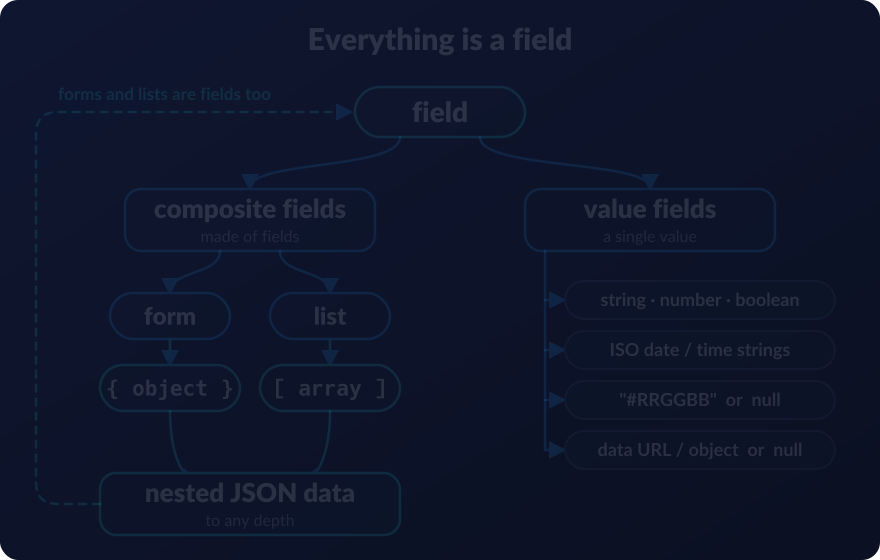
👉 See What SmarkForm Is (and Isn’t Yet) for more details.
Want to dig deeper right away? Head to the 🔗 Showcase to explore interactive demos — including the example above — that show SmarkForm’s full potential at a glance.
Prefer to jump straight into code? Browse 🔗 Live Examples for a collection of ready-to-use, downloadable forms you can run locally and start tinkering with immediately.
Main Features
<>Markup agnostic: Maximum decoupling between design and development teams.🧩Low code: No manual wiring between controls and fields.🗂Subforms: Nested forms to any depth.📑Lists: Sortable and variable-length lists (arrays) either of scalars or subforms.🫳Configurable hot keys: Context-driven and discoverable keyboard shortcuts.🫶Consistent UX: Smooth navigation and consistent behaviour across all forms.{}JSON format: Data is imported / exported as JSON.🪶Lightweight: Only 109KB minified.♿Accessibility: Focus on UX and accessibility (a11y).🆓Dependency-free: No external dependencies required.🤖AI-agent ready: Generate complete, working forms by describing them to any AI assistant.💪Flexible, extendable and more…
Current Status
SmarkForm implementation is stable and fully functional, but not all initially planned requirements are yet implemented. Hence, it’s not yet in the 1.0.0 version. [🔗 More…]
Last Updated: Mon Oct 26 2026.
Where to Go Next?
To get started with SmarkForm you can:
| 👉 Take a look to our 🔗 Showcase section to see its full potential at a glance. |
| 👉 Follow our 🔗 Quick Start Guide to rapidly dive in. |
| 👉 Check out our 🔗 Downloadable Examples to see them in action and/or start tinkering. |
| 👉 Examine our 🔗 FAQ to find answers to common questions. |
Community and Support
If you don’t find a solution there, feel free to open a discussion on our GitHub repository.
For further support, you can contact me through our Contact Page or reach out via email at smarkform@bitifet.net.
If you want to stay updated with the latest news, releases, and announcements, or join the community chat, you can follow us on Telegram:
🚀 Stay tuned


Contributing
We welcome any feedback, suggestions, or improvements as we continue to enhance and expand the functionality of SmarkForm.
👉 See the 🔗 Contributing Section for more details.